OpenAI Debuts ChatGPT Plugin Extensions at Dev Day, Letting Developers Build Custom Apps
By admin | Sep 29, 2026 | 2 min read
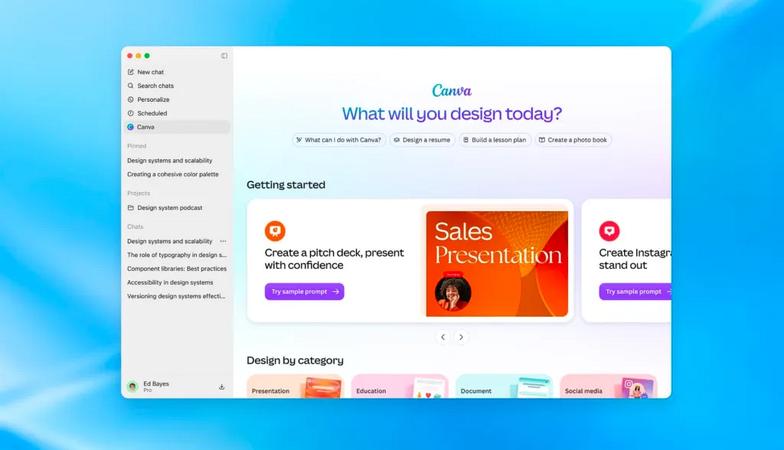
OpenAI is expanding its reach beyond just productivity tools with ChatGPT's new Pages, Slides, and Space features. The AI company now has its sights set on any application that functions better when integrated with ChatGPT. During Tuesday's Dev Day presentation, OpenAI announced that developers can now create app-like experiences directly within ChatGPT through plugin extensions.
While OpenAI already supports plugins that link ChatGPT to common tools such as Slack, SharePoint, Airtable, and Google Drive, these new plugin extensions will provide apps with their own dedicated space in the ChatGPT sidebar. Developers will also have the ability to create interactive panels that allow users to engage with their tools while conversing with ChatGPT. According to the company, this experience can incorporate file viewers that handle whatever file formats the developer's product supports.
Additionally, OpenAI is simplifying the plugin development process and making it easier for end users to discover them. Developers now have access to a new Plugin Creator tool for building, and they can submit plugins to the directory through a redesigned process that provides more transparent feedback. The company has also enhanced how plugins are ranked and recommended within its directory, as well as how they appear during conversations. Users can individually approve access requirements when selecting a plugin to work with.
Furthermore, ChatGPT Sites—the lightweight websites users can create with ChatGPT—can also host these plugins. This would enable someone to share their apps with colleagues, who can then use them with their own connected data and permissions. OpenAI also revealed it is adding support for the proposed MCP Events specification, which would let plugins trigger automations based on events occurring in a connected app. The company is making automations simpler to add and manage as well.
RELATED ARTICLES


Comments
Please log in to leave a comment.

No comments yet. Be the first to comment!