Google Unveils AI-Powered Glasses with In-Lens Display at I/O: Hands-On with Android XR Visual Experience
By admin | May 22, 2026 | 15 min read
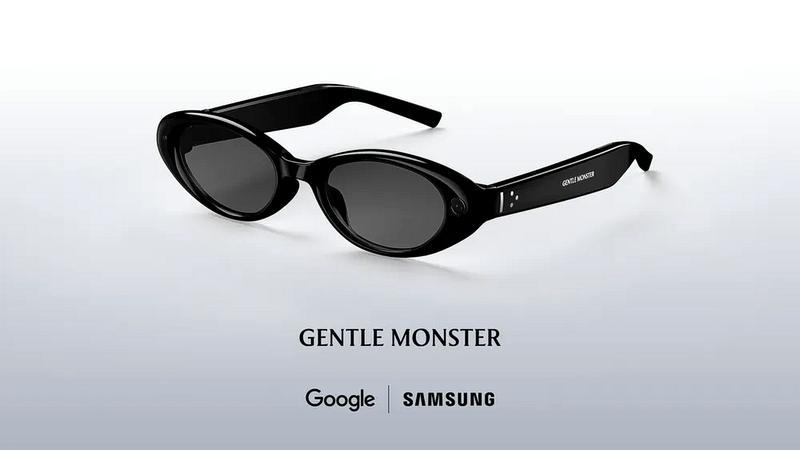
At Google's I/O developer conference this week, we got a chance to briefly try out its upcoming AI-powered glasses—not the audio-only pair set to ship this fall, but the version that combines audio with a visual display. First unveiled at last year's event, these Android XR glasses feature an in-lens display that projects useful information overlaid onto the real world. This includes widgets for things like weather updates, walking directions, Uber pickup details, live translation, and even custom widgets you can design using AI.

The company noted that the glasses will pair with both iOS and Android phones, whether in the audio-only format or the future display version. The display-equipped eyewear is intended as the next step beyond the first-generation audio glasses arriving later this year. Developed in partnership with Warby Parker, Gentle Monster, and Samsung, these glasses blend Google's technology with each brand's design aesthetics.
The pair we tested was still very much a prototype, though polished enough for external testing. Representatives demoing the XR glasses explained that this prototype allowed Google to set aside cosmetic details related to different styles and shapes, focusing instead on experimenting freely with the display technology and its impact on battery life. This means the spectacles are quite different from any future shipping version in terms of fit, shape, dimensions, and attention to detail. It's more like being able to experiment with the "insides" of the glasses while still in a basic, comfortable frame. The shipping version will detect when the glasses are placed on or removed from your head, but the ones we tried lacked this feature.

To activate Gemini, you press and hold the right side of the glasses' frame for two seconds. A startup chime sounds, letting you know Gemini is on and listening. In the demo version, starting Gemini also activated the camera simultaneously, but the shipping version will let users configure whether to turn on the camera when Gemini starts. During an initial test, we played music by asking Gemini to play a favorite artist. The noisy venue made it hard to evaluate sound quality, as the music was turned up to maximum volume yet remained difficult to hear crisply and in detail. This limited experience suggested the glasses wouldn't replace high-quality earbuds but would suffice for listening to music while walking, hiking, or doing chores. A key advantage of not having earbuds in is that you can hear someone talking more easily, compared to transparency modes on devices like Apple's AirPods. To stop the music, you simply tap once on the side of the frame, around the middle, as if tapping your temple.

In the second test, we pressed the photo capture button with our finger to take a picture of a person. The display was off, so the photo transferred to our phone and watch. (Later, you'll be able to capture video with a long press, but this option wasn't available for testing on the prototype. For video, you'd see a video thumbnail preview instead of a photo.)
You can also simply ask Gemini to take a photo without pressing the button and perform AI manipulations on the result. For example, you might say, "Take a photo and turn the person into an anime character." The photo goes to the phone, then to Gemini and Nano Banana servers, and returns in its edited version. At the Google I/O venue, where Wi-Fi was heavily loaded, the round-trip took about 45 seconds.

With the display enabled, a simple home screen appears in your field of view. The demo version had preloaded widgets showing the weather and a countdown to Google's I/O event. You could also build quick launchers for specific apps like Google Maps or Translate, if those were your main use cases for the glasses. The prototype had just one display over the right eye, but the platform supports both single and dual displays, as well as audio-only glasses. The image was a bit fuzzy, which we attributed to our prescription contacts—one lens optimized for distance and the other for near vision. When we closed one eye, the image came into better focus, but the experience almost immediately caused some eye strain above the right eye, and it's unclear if the prescription was entirely to blame.

One of the most impressive demos was the language translation experience, powered by the Google Translate app on the phone. One demonstrator spoke rapid Spanish, and the glasses automatically detected the language, displaying English text on the display while Gemini spoke English in our ear. World travelers might buy the glasses just for this feature. Note that Translate will also work on the audio-only glasses, but without the text display—you'd see the transcription on your phone if needed, in addition to real-time audio feedback. Another demo involved using the glasses for navigation. While we couldn't leave the venue to test accuracy, we got a sense of how it would work. You start the Google Maps experience by asking Gemini to navigate to a destination, even something as vague as "the nearest coffee shop."
Gemini activates Google Maps on your phone, but you don't need to take your phone out of your bag or pocket. After a brief loading delay, the glasses display turn-by-turn directions. When looking forward, you see your next turn. To get oriented, you can look down at the ground and see your blue dot on a map. You can turn left or right to rotate in space, just like on your phone. Then, looking up again, you can keep walking without the map obstructing your view. Since the experience ties to Google Maps on your phone, saved destinations like "home" and "work" are already available.

We also briefly used the glasses to identify objects in our view and ask questions about them. The glasses initially struggled to identify a replica of a Monet painting on a shelf, likely because the prototype didn't automatically enable the camera—it had to be turned on from the app. Even after moving closer to focus on the Monet signature in the bottom left, it took a couple of questions before Gemini said it looked like a Monet. Other tests went more smoothly, as the glasses immediately identified a plant on the shelf and answered questions about recipes in a book. Still, we realized these are things you can already do with Google Lens (or other AI models in chatbot apps), though it's interesting to do them without pulling out your phone. Google says it will share more about its Android XR display glasses later this year, when it expands its trusted tester program.

In the meantime, the company believes audio will suffice for some users' needs—a smart way to spin the fact that it doesn't have its display glasses ready, despite competition from Meta and Snap. Like the display version, the audio glasses provide access to Google's Gemini AI, heard privately through the glasses' frame speakers. You can listen to music, press a button to take a photo, make a call, or tap into phone apps, just as on the future display versions. Tapping into third-party apps wasn't part of our demo, but the glasses will let users tell Gemini to do things like "take the ingredients from this recipe and add them to my shopping list."
In another example Google showcased during the keynote, the glasses could see a meal being cooked on the stove and offer feedback, such as whether the meat was fully done.
RELATED ARTICLES
Comments
Please log in to leave a comment.

Cool product, exited to try it out
Same here!
Эксклюзивные ландшафтные проекты https://berezov-lsk.ru/ Работаем по графику https://berezov-lsk.ru/ 5 Общая оценка 5 Соотношение цена/качество 5 Соблюдение сроков 5 Чистота во время работ 5 Порядочность компании https://berezov-lsk.ru/ Экспертная https://berezov-lsk.ru/ Реализуем любой стиль дизайна https://berezov-lsk.ru/ КП Яхрома парк, 20 соток https://berezov-lsk.ru/