Apple Unveils Enhanced Liquid Glass Transparency Controls in iOS 26.2 Update
By admin | Dec 13, 2025 | 4 min read
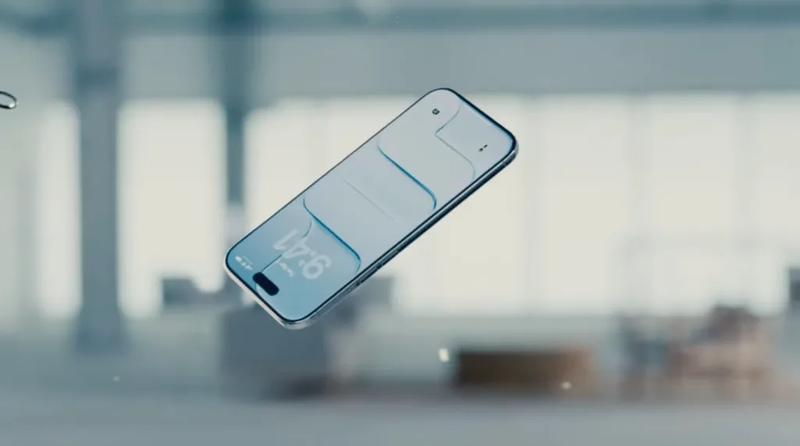
Apple has introduced another feature to reduce the transparency of Liquid Glass with the launch of iOS 26.2, available immediately. This update gives users control over how transparent the Lock Screen clock appears.
The move follows an earlier update that added a slider for adjusting the opacity of Liquid Glass elements system-wide, which came in response to user feedback that the visual changes made their iPhones and other Apple devices harder to read. First introduced with iOS 26, Liquid Glass is a new design language that makes interface components—such as buttons, sliders, and notifications—semi-transparent. These elements also bend light, giving them a glass-like visual effect.
Intended to modernize Apple’s operating systems and possibly lay the groundwork for future AI smart glasses, Liquid Glass has received a mixed reception. Some users reported that the transparency made their devices more difficult to use, obscuring important information like notifications or artist names in Apple Music.
In answer to these complaints, Apple previously released a Liquid Glass tool in iOS 26.1 that let users revert their interface to a more "frosted" appearance if they preferred. Now, with the new slider for the clock’s transparency, Apple is again scaling back the Liquid Glass effect—though this time as another user-adjustable customization option rather than a system-wide change. 
These adjustments are significant because they suggest Apple may not be fully convinced that the design overhaul is perfect in its current form. The timing of these changes is also noteworthy. Earlier this month, Apple confirmed that Alan Dye, the design executive who led the Liquid Glass redesign, is leaving the company to join Meta.
While there was no indication Dye was forced out, Apple has replaced him with longtime Apple designer Stephen Lemay. Unlike Dye, Lemay has built his career in interface and interaction design—a skillset that could prove valuable in refining the Liquid Glass experience.
Beyond the latest Liquid Glass tweaks, iOS 26.2 introduces several other new features. As seen in earlier betas, users can now generate AirDrop codes to share with people not in their contacts, allowing those individuals to become "known" AirDrop contacts for a 30-day period. This could be useful in workplace settings or other situations where you need to share files or photos with someone not saved in your Contacts.
Other additions in iOS 26.2 include alarm support in Reminders, a new Following tab in the Apple News navigation bar, offline lyrics in Apple Music, and AI-generated chapters for podcast episodes in the Podcasts app—along with a Podcast Mention feature for linking to other shows and various other improvements. Apple Watch users will also now receive a Sleep Score based on how well they slept and whether they met their sleep targets.
Additionally, Apple rolled out important security updates on Friday across its flagship products—including iPhones, iPads, Macs, Apple TVs, and Apple Watches—to address vulnerabilities exploited in an active hacking campaign.
RELATED ARTICLES


Comments
Please log in to leave a comment.
No comments yet. Be the first to comment!