Apple Integrates AI Coding Agents Like Claude and Codex Into Xcode 26.3
By admin | Feb 03, 2026 | 6 min read
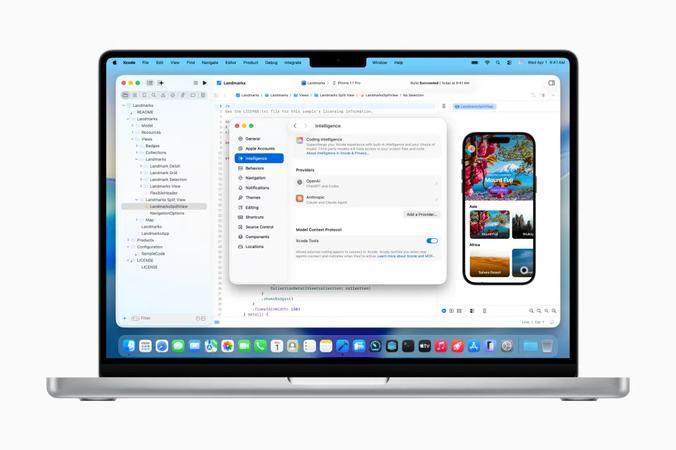
Apple is introducing agentic coding capabilities directly within Xcode. This Tuesday, the company unveiled Xcode 26.3, enabling developers to utilize agentic tools such as Anthropic’s Claude Agent and OpenAI’s Codex inside Apple’s official app development suite. The Xcode 26.3 Release Candidate is now accessible to all Apple Developers via the developer website, with an App Store release to follow shortly.
This new update follows last year’s Xcode 26 release, which first integrated support for ChatGPT and Claude into Apple’s integrated development environment (IDE). This environment is used for building applications across iPhone, iPad, Mac, Apple Watch, and other Apple hardware platforms. By incorporating agentic coding tools, AI models can now access a broader range of Xcode’s features, enabling more sophisticated automation and task execution. These models will also have real-time access to Apple’s current developer documentation, ensuring they utilize the latest APIs and adhere to established best practices during development.
At launch, these AI agents can assist developers by exploring a project’s structure and metadata, building the project, running tests to identify errors, and implementing fixes as needed. 
In preparation for this launch, Apple collaborated closely with both Anthropic and OpenAI to design the new experience. The company emphasized significant work on optimizing token usage and tool calling to ensure the agents operate efficiently within Xcode. Xcode employs the Model Context Protocol (MCP) to expose its capabilities to the agents and connect them with its internal tools. As a result, Xcode can now collaborate with any external MCP-compatible agent for tasks like project discovery, modifications, file management, previews, snippets, and accessing up-to-date documentation.
Developers interested in trying the agentic coding feature should first download their preferred agents through Xcode’s settings. They can also link their accounts with AI providers by signing in or adding an API key. A drop-down menu within the app lets developers select their desired model version, such as GPT-5.2-Codex versus GPT-5.1 mini. Using a prompt box on the left side of the screen, developers can instruct the agent in natural language—whether describing a new project they want to build or specifying code changes. For example, a developer could direct Xcode to add a feature using one of Apple’s frameworks, detailing how it should look and function. 
Once the agent begins working, it breaks tasks into smaller, visible steps, making it easy to track progress and code changes. It also proactively searches for necessary documentation before starting to code. Changes are visually highlighted within the code editor, and a project transcript on the side of the screen provides insight into the underlying processes. Apple believes this transparency will be especially helpful for new developers learning to code.
To support this, Apple is hosting a “code-along” workshop this Thursday on its developer site, where users can watch and learn how to use agentic coding tools in real time alongside their own copy of Xcode. After completing its work, the AI agent verifies that the generated code functions as expected. Based on test results, the agent can make further iterations to resolve any errors or issues. Apple noted that prompting the agent to think through its plans before writing code can sometimes improve the process by encouraging pre-planning.
Additionally, if developers are unsatisfied with the results, they can easily revert their code to its original state at any point, as Xcode automatically creates milestones each time the agent makes a change.
RELATED ARTICLES

Comments
Please log in to leave a comment.

No comments yet. Be the first to comment!