OpenAI Launches Its First Hardware: A ChatGPT Keypad That Delights Tech Fans and Confuses Critics
By admin | Jul 25, 2026 | 4 min read
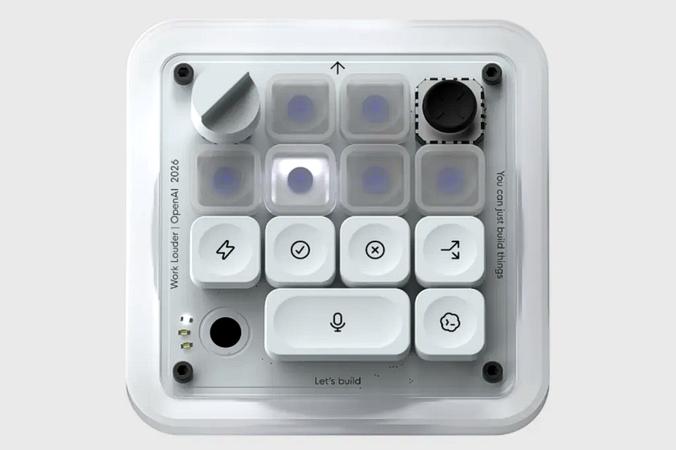
OpenAI recently introduced its first hardware product—a compact keypad designed to work alongside ChatGPT. Called Micro, it was created in partnership with Work Louder, a company known for crafting specialty keyboards. The result is a quirky, workplace-oriented gadget that will likely appeal to tech enthusiasts while leaving many others scratching their heads.
OpenAI’s entry into the hardware space hasn’t been without controversy. A few weeks ago, Apple filed a lawsuit against the AI company, accusing it of stealing trade secrets—kicking off what promises to be a drawn-out legal dispute. At the same time, reports of another smart home device in development at OpenAI have sparked curiosity. That rumored product, also built to integrate with ChatGPT, is said to be the work of former Apple engineers. Until that legal battle is resolved and OpenAI’s broader hardware plans come to life, the company’s most tangible offering is Micro—a funky little keypad clearly designed to win over the tech industry’s coding crowd.
The first thing you’ll notice when you pick up Micro is how solid it feels. It’s sturdy enough that if the whole AI accessory idea fizzles, it could easily double as a paperweight. Another detail that stands out—and I’m not alone in pointing this out—is the packaging: an immaculate white box with a sleek, minimalist look that feels distinctly Apple-inspired. Draw your own conclusions.
The keypad features six frosted “agent” keys at the top, which you can customize to perform specific tasks within ChatGPT or its coding tool, Codex. Below those are six command keys for controlling those programs. You can connect Micro to your computer via Bluetooth or a USB cable.

Perhaps the most practical feature of Micro is a dedicated button for voice dictation. Just press and hold it, speak your request, then tap the adjacent “send” button to submit it. Customization happens within ChatGPT itself, where a Micro tab lets you tweak everything from key brightness to the commands and projects linked to each button.
Hard-core coders—the device’s intended audience—haven’t exactly welcomed it with open arms. Reddit reviews are largely negative, with one user calling it “a prank and not a real product,” while others argue serious developers won’t bother with it. A review from the smaller outlet Aftermath was even more cutting, describing the $230 price tag as hard to justify compared to cheaper DIY or off-the-shelf alternatives. (The review’s title: “OpenAI’s expensive macropad feels engineered to piss me off specifically.”)
It’s true that new users may need time to figure out how Micro works and what to do with it. Once I got the hang of programming the keypad to my liking, I found it surprisingly enjoyable. You can assign different ChatGPT sessions to specific keys, making it easy to switch between projects. Combined with the dictation button, the whole experience becomes more efficient and even fun. But there’s still a learning curve. Micro’s buttons are color-coded: white means an agent is idle, blue means it’s thinking, green signals a completed task, and red indicates an error. You’ll need to memorize that—along with which projects are tied to each key.
The big question is whether Micro is functionally easier to use than just sticking with your laptop. In short: Why spend a week learning to program and operate this thing when you already know how to use a mouse and keyboard? Ultimately, your experience with Micro will depend on how much you rely on ChatGPT. Since I don’t use AI much day to day, I’m probably not the target audience. That said, if you’re a ChatGPT power user with $230 to spare and a fondness for vintage-looking hardware with clicky buttons, Micro might not be a bad purchase—it could even bring a bit of joy to your desk.
RELATED ARTICLES

Comments
Please log in to leave a comment.

No comments yet. Be the first to comment!